
常用操作
- Rebase最新mastert提交
git fetch origin && git rebase origin/master - 合并最新的N个提交
git rebase -i HEAD~N - 删除远程分支
git push origin --delete name - 关联远端分支
git fetch origin dev_b && git checkout dev_b拉取其他远端分支并切换过去git branch -u origin/dev_mz关联远程分支git branch -vv查看本地分支与远端分支关联关系
- 查看状态
git show HEAD --stat查看某个提交改动文件行数git status -s查看当前修改、提交状态git log -stat显示commit历史及变更文件
- Git worktree 创建目录隔离、不用commit/stash就能切走的分支。
git worktree add ../project_tmp dev_mz该分支仅可绑定一个 worktreegit worktree remove ../project_tmp用完删除
工作区原理
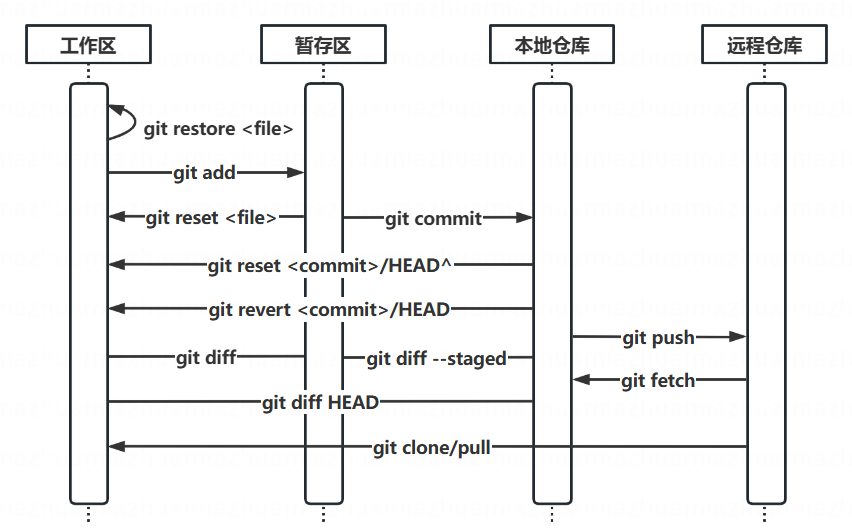
Git里有三个区域很重要,下图解释了这三个区域的状态的变化过程:
- HEAD 指向最近一次commit里的所有snapshot
- Index 缓存区域,只有Index区域里的东西才可以被commit
- Working Directory 用户操作区域
初始状态
当 git checkout 的时候,git做了三件事情:
- 将 HEAD 指向那个分支的最后一次 commit
- 将 HEAD 指向的 commit 里所有文件的 snapshot 替换掉 Index 区域里原来的内容
- 将 Index 区域里的内容填充到 Working Directory 里
此时 HEAD、Index、Working Directory 里的内容都是一样的。Index中的内容不是空的,并非只有 git add 后才会有东西。
Changed
如果你在 Working Directory 里修改了文件,则 Working Directory 里的内容和 Index 区域里不一致了。
这个时候git status的结果是:Changes not staged for commit
Staged
一个文件仅仅 changed 是不能被 commit 的,Git 要求只能提交 Index 里的东西。
所以需要 git add。这个命令的意思是,把 Changed 的文件的内容同步到 Index 区域里。这样 Working Directory 和 Index 区域的内容就一致了。这个过程被称之为 stage
这个时候git status的结果是:Changes to be committed
Committed
最后通过 git commit 提交后,HEAD 的状态和 Index 以及 Working Directory 就形成一致了。
SSH key
- 创建密钥
ssh-keygen -t ed25519 - 查看密钥
cat ~/.ssh/xxx - 添加密钥 Settings -> SSH and GPG keys -> New SSH key
- 确定一下ssh-key是否添加成功
ssh -T git@github.com
Config
全局/仓库配置(–global/local)
1 | git config --global -l |
配置别名,在 .gitconfig 中加入
1 | [alias] |